
Building My Own Operating System
Day 1
On the previous series we discussed about the overall unix system superficially touching most of its important parts. Today we go a little deeper on the two major modules of the unix kernel. The File system module and the Process module. Let's picture the modules with three distinct layers, user layer, kernel layer and hardware layer.
We switch from user layer to kernel layer with the system calls. From what I have understood a process first runs/initiates in the user layer with user execution mode and when a system call is invoked within the process, a "trap" function/primitive is called which changes the execution mode to kernel mode with a interrupt or say it triggers a interrupt which changes to the kernel mode of execution. Talking about the system calls that is the service provided by the kernel and I think of it as sitting in the layer between the user and kernel layer.
Then lets also talk briefly about the hardware layer too. The kernel contains device drivers whose primary job is to communicate between that particular device and the kernel. I picture it as a translator between the kernel and the hardware device. There is another module called hardware control which provides signals from the device to the kernel in the form of device interrupts and events.
OK with a brief talk about these layers lets focus our attention to the kernel layer, this is the layer which I am most interested about.
First of all lets explore the file system module. As we have known the kernel code/process resides and runs on the main memory, it is required the disk data to also be present on the main memory for its operation. As the main memory has limited size and is quite small in comparison to the secondary memory, we need a mechanism for loading the data in the secondary memory to the main memory for a certain amount of time. And the mechanism should assist on the manipulation of the data loaded in the memory to manipulate and operate(read/write/lock/modify) and later write the data back to the secondary memory.
All all this mechanism we just discussed is managed by the Buffer Cache. The major advantage of this mechanism is different processes could manipulate the cached data in the memory with very low latency as we just need only one read operation on the disk while loading and many process could consume the data and later when there is no use of the data we could write it on to the disk. This is the heart of the unix file system as every read/write operation on any data/file goes through this module and the kernel file system module doesn't need to know anything about the disk.
For the file system module to work correctly we have to manage our disk too in a certain format so that the user/kernel can have the illusion of hierarchical tree like file system.
A disk whether a hard disk, SSD or the og tape writer is logically divided into many logical devices with its corresponding logical device number. From the system stand point each logical device is its own device witha file system no matter how many logical devices be in asingle actual disk.
Inside each logical device, its linearly layered out into 4 sections. Boot Block, Super Block, Inode List and Data Section.
__________________________________ _ _ _ _____________ _ _ _ __
|             |             |               |                  |
| Boot Block  | Super Block | Inode List    | Data Section     |
|_____________|_____________|_____ _ _ _ ___|_________ _ _ _ __|
The boot block located on the first sector of the disk is a fixed size section that may contain program for booting/initializing the system when we power on. At least one logical device/file system contains the actual code and others may be empty.
Then starting from the end of boot block we have the fixed size super block. It contains information about the file system such as its overall size, maximum numbers of files it can store, lists of free inodes and other important information such as size of a single block(eg 512 bytes or multiple of 512 bytes, 1KB, 2KB, etc).
From the end of the super block inode list starts. Inode is an important data structure in the file system where each inode is listed as an linear array across the section and each inode is the primary entry of a file which contains information about the file such as its owner, group, access/modify time, access permissions and links. Every file have a single inode entry thus a single inode number. Inode also contains the pointers to the address of actual data blocks in the data section of its file. I was wondering why there is no mention of the file name, but what I found out was file name is only for the user level and us human can remember the unique inode numbers and we work quite well with name associations. So when we open/access a file with a filename the kernel algorithm parses the path and file/directory names to get the inode number that the kernel uses to get access to that file. We suerly will have a deep dive in this topic in further series.
Now the main boss process system module. Let's explore it. Its a huge and honestly confusing and complex topic and I am trying hard to grasp its concept as much as possible. The main takeaway I explored while studying it right now is a process is the executing/running instance of a program. Whereas a program is a set of machine instructions, data and addresses. This is what we get after we compile a c file to an executable file.
Multiple processes whether from single program or from multiple programs can run simultaneously on a system. Now I was wondering for example a single core processor how can multiple processes run at the same time? And the engineering the system does was interesting. Precisely saying only one process can have the CPU resources for processing at a time, but the kernel schedules each process for a certain time limit fairly as possible so that we have an illusion that multiple processes are running simultaneously. And the sub module that does this job is called the scheduler. I must say very creative name. Haha.
The scheduler submodule applies a bunch of rules on each process so that each process gets a fair share of the resources. There is a time slice set by the kernel on each process so that processes can switch on a time bound, the switching of processes is also technically called context switch. This naming is not random because the kernel runs a process and wwe say the system in running in the context of that process. So switvh in the running process is called context switch.
Now I think we have come to a conclusion that a process is complex as it gets so only the time slice cant justify the overall transitions of processes. So different distinct states are categorized in a process that helps the sheduler to manage all this process switching. And a state diagram will be helpful here to decode the flow of a process during its life time.
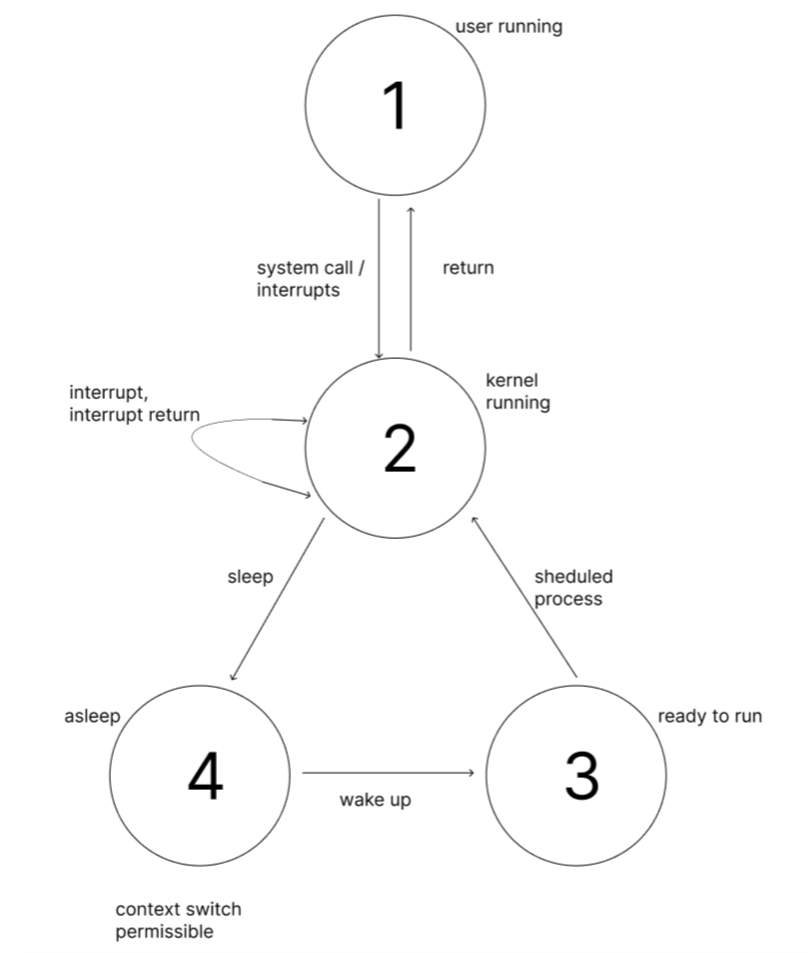
Looking at the above diagram, on 1 and 2 are user running and kernel running that are the two different running states of a processes on the two execution mode. A process can only be one of the states shown above. Let's now tak about the asleep state, in this state context switch is possible. Meaning we have already assumed a process at a time is only running at a time so when the state changes from kernel running to asleep then only the scheduler can pick any process that is in the state of ready to run and changes its state to kernel running. Let's decode this. We can see from here that when a user process calls a system call or have an interrupt or the process time bound is complete then it switches to kernel running state i.e. the process is running in the kernel execution mode, now when the process has nothing to execute in conditions such as waiting disk I/O to complete, waiting on a event or exit of another process or any asynchronous process its put on the asleep state with the particular event to complete. Now when the event completes it goes to the state ready to run and the scheduler can pick any process on this state and switches its state to kernel running. This way every process on the read to run state have a fair chance of getting picked by the schedular.
One important thing to realize is that a process in the kernel running state cant be put to asleep by other process but only by the kernel itself. Its because on the kernel mode the kernel might be operating/manipulating its global kernel data structure, and it the middle of this operation if any other process other then the kernel could put the process to asleep then the process goes to sleep and other process could corrupt the kernel data structure that was not complete.
Yes interrupts could also interrupt the process and corrupt critical data structures, but the kernel applies many mechanism such as masking the interrupt, locking mechanism, atomic operations but this topic we have to deep dive further on the next coming series. What we can take away with all this state diagrams and other mechanisms is that kernel implements all this mechanisms to avoid corruption of data and race conditions and keep the system data consistent.
Another critical operation the kernel process system module does is memory management. As we already know processes in the unix system have a fair chance of getting the resources, we already talked about the scheduler module that manages the processor with its state, the main memory where the program code resides also needs proper management.
The memory management module manages the loading of the program code from disk to the main memory, putting it on the memory sections, mapping its virtual addresses to the actual memory addresses(though recent memory maintains the table for this mapping purpose), diving and formating the code/program data and code to proper structure, sharing sections of memory to different programs, cleaning up and removing the existed programs and the other important part is swapping the inactive/active programs/process from main memory to secondary memory as the main memory space is limited and can get low.
Now on the main memory for a program it has its instructions called text, its global and local variables and stacks(its a dynamic structure that manages the calling and returning of functions/procedures in a stack format). When the program initiates as a process there are also other process data structures for managing all the processes. So the take away is memory management is also a critical operation of the kernel for its smooth operation and we will have a microscopic look on it as we go along.
Phew, my head is literally heavy right now. We have encountered many concepts today and I will now take my time to process and digest all this concepts for today. Tomorrow is an exciting day for me as I will explore the working of the buffer cache and I will implement my first buffer cache. I take it as my first step to build the file system module and an important one. So see you guys and gals tomorrow.
Till then. Have a good one. Cheers. Om nama shivaya.